Scheduling: Difference between revisions
| Line 198: | Line 198: | ||
<br> | <br> | ||
The following are a few tips to keep in mind immediately after involvement in a collision: | The following are a few tips to keep in mind immediately after involvement in a collision: | ||
'''1.''' Shift your vehicle into "park." | '''1.''' Shift your vehicle into "park." | ||
'''2.''' Check yourself and any passengers for injuries. | '''2.''' Check yourself and any passengers for injuries. | ||
'''3.''' If you cannot move your vehicle, or if medical assistance is needed, dial "911" and follow the operator's instructions. | '''3.''' If you cannot move your vehicle, or if medical assistance is needed, dial "911" and follow the operator's instructions. | ||
<br> | <br> | ||
| Line 222: | Line 225: | ||
Once you’re in a safe location: | Once you’re in a safe location: | ||
*Submit a Frost Incident Form - https://clients.frostproductions.biz/incidentform | *Submit a Frost Incident Form - [https://clients.frostproductions.biz/incidentform FROST Incident Form] | ||
*Be sure to include all photos of driver information and damage to vehicles | *Be sure to include all photos of driver information and damage to vehicles | ||
*For insurance purposes, a Report of Motor Vehicle Accident should be filed with the Department of Motor Vehicles. | *For insurance purposes, a Report of Motor Vehicle Accident should be filed with the Department of Motor Vehicles. | ||
Revision as of 13:34, 25 January 2024
Welcome to Frost Productions. This is a basic outline of how to best communicate with our Scheduling Department.
Contacting the Scheduling Department
New York Office
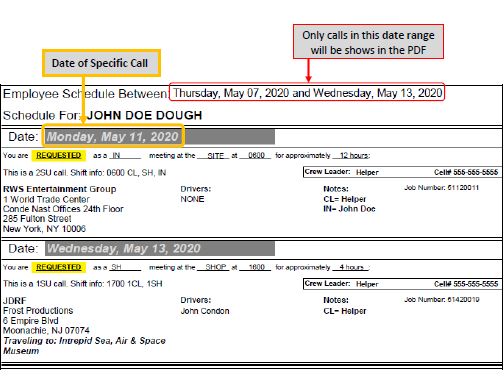
Please find the contact information for our New York Schedule Team below. If you are calling out of a shift, you MUST contact your crew leader first. The Crew Leader for each shift is listed on your schedule PDF. After you have contacted your Crew Leader, you can then notify the Schedule Team that you will need to be replaced.
- Email: Schedule@FrostProductions.com
- Text Alerts: (646) 481-3474 (do not call this number, text only)
- Office Phone: (212) 751-2391
Boston Office
- Email: KarenS@FrostProductions.com
- Office Phone: (617) 544-7555
Shift Schedules
How to Read Your Schedule
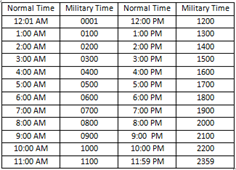
Below you will find a sample schedule PDF and a breakdown on how to read this document. Frost Productions works on military time. Please note, that to be confirmed for a Requested call you must respond to the email containing the PDF attachment AND receive a confirmation response from the Scheduling Department.
How to Confirm Calls
Once you receive a schedule PDF, please carefully review each call you are requested for and reply to the email sent to you as soon as possible to let us know if you are confirming or unable to make those calls. Please make sure to review every aspect of every call: Call time, length of shift, dress code, meeting location, assignment etc. Note that call length is an approximation, subject to changes while onsite. If you have a question about what you’ve been sent, please let the Scheduling Team know via email and they will help clarify.
Please note that Frost utilizes a military time system. If you ever have a question or need clarification on which date a call is occurring, please ask and we will be happy to clarify. Please refer to the chart below.
Calling Out of a Confirmed Shift
On the rare occasion that you are unable to make your call and you need to call out, please make sure to let the proper people know as soon as possible, especially if this is a last-minute issue. If you are unable to make a shift or are running late, you must alert your Crew Leader as soon as you are able and then follow up with the Scheduling Team via email.
- If this is a “day-of” cancellation, you must call/text your Crew Leader ASAP to let them know you will not be there.
- You must also e-mail the scheduling team ASAP and contact the office at: (212) 751-2391
Availability
Updating Availability
An availability email blast will be sent out at the beginning of every busy season. Please be sure to indicate when you're NOT available. Be as specific as possible.
Throughout the busy season the Schedule Team will send out availability emails for the upcoming month or so. If you have already been updating us regularly regarding your availability – that’s great! Please continue to do so. You should also feel free to respond to the availability blast anyway, as there may have been changes to your schedule since we last heard from you.
Hold Requests
You may also receive a “Hold Request” email from the Schedule Team as we encounter particularly busy days in the field. On those days, we are often looking at scheduling no less than 70 - 80 people. Please respond to those emails as soon as you can to help us estimate how many of our Frost Freelancers will be available and to secure your hours for that day. We will then respond that you are on hold for the day. As we get closer, we will be able to provide further details as information on our end solidifies.
Onsite Reminders
Safety Reminders
If you have not received a copy of the Frost Employee Handbook, let us know and we will send one along
Beginning of Shift Procedure
When you arrive at your assigned job site, you must check in with your Production Leader and you must clock in via our time clock site/app.
- If you have questions about your meeting site before the day of, please feel free to contact the Scheduling Team and we will do our best to clarify.
- If you have questions the day of the event – please call the Production Leader for your shift. Please do not call the Scheduling Team unless you are having trouble reaching your Crew Leader.
When you arrive at your scheduled calls you must punch in, as you are responsible for clocking your own hours to get paid. Remember: you must also punch in and out for your breaks.
Onsite Attire
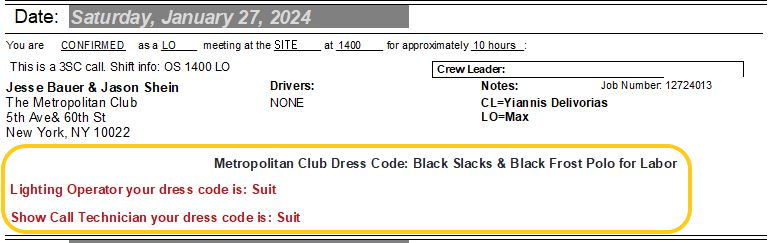
Unless otherwise stated in red lettering on your schedule pdf (example below), the dress code for all set-up and strikes is a Frost t-shirt, clean work pants, and work boots. Please don't arrive to site in inappropriate attire.
- Show Call Dress Code Requirement: If you're scheduled to work the show call of an event, you ask that you wear a suit. The suit should be a dark or neutral color, with a clean collared shirt, neutral-colored tie, and dress shoes. You may bring your suit to change into before the start of the program. If you do not have a suit, show blacks with a collared shirt and/or dark-colored sports coat or blazer would be most appropriate.
- Met Club Dress Code Requirement: The dress code for The Met Club will ALWAYS require you to wear the black Frost polo, clean work pants, and work boots.
Onsite Etiquette
Keep in mind that you are a representative of Frost Productions and while onsite you should act in a safe, courteous, and professional manner. Work with clear intent and purpose without compromising safety.
Phones & Photography
Please refrain from using your cell phone on site. Texting or making phone calls while working creates a distracting and disruptive environment that can potentially endanger yourself and your surrounding crew members. Please refrain from taking any onsite pictures as design elements are the intellectual property of the designers and have been contracted exclusively by and for our clients.
End of Shift Procedure
You need to check with the Production Leader for your shift before clocking out via our time clock site/app and leaving the job site. You must punch out when you leave the job site; not at the end of your scheduled shift. If you ever forget to punch in or out for a shift, or are having difficulty with the time clock system, please contact Payroll@FrostProductions.com directly.
Show Call Reports
A Show Call Report is required for every show-call shift. If you work a show call shift with Frost, please take 15 minutes at the end of the event to compose and submit a report immediately upon completion. Please be sure to include the job name/venue, the date, hours worked, a general summary of the event, and any specific information regarding equipment issues or additions. Reports can be submitted using the online form at www.frostproductions.com/showcall or in the body of an email sent to Showcalls@FrostProductions.com.
Crew Leading
Crew Lists
The Scheduling Team will send you a Crew List with all pertinent information the day before the event.
The Account Salesperson and Production Manager will also be copied on the crew list email as well if you have any questions.
Time Keeping
You will need to track the following times for each crew member:
- when your crew members arrive
- any breaks they take when they happen (Be sure to note the beginning and end of any breaks taken)
- when they leave.
Be sure to touch base with any Crew Leaders or Production Managers who may be on site with you but in a different location with a crew. You’ll need to coordinate to track everyone’s timing while on site so there is no unnecessary overlap.
Each employee is responsible for clocking their hours with the time clock app. Each employee has been sent separate instructions during their onboarding process. A quick reminder at the beginning and end of each shift will help your crew members remember.
Reporting Responsibilities
At the end of each event, please take 15-20 minutes to complete the Production Time Sheet; linked here: www.frostproductions.com/timesheet/ This is where you will record everyone’s times along with any notes that require our attention.
If you have trouble with the site loading, please e-mail the information to timesheet@frostproductions.com. The report can be formatted something like this:
- Date:
- Job Name: (Job Location)
- Job Type: (SU/SC/ST)
- Crew Leader: (You)
- Crew Leader’s Email:
- Employee 01: John Smith
- Shift Start: 10 AM
- Break Start: 1 PM
- Break End: 1:30 PM
- Shift End: 6 PM
- Etc…
- Additional Notes:
Emergency or On-Site Incidents
In the event of a crew member’s injury, please attend to the person/injury accordingly (first aid, urgent care, or 911 as needed).
- If the incident is non-emergent and does not require emergency attention, please be sure to mention the incident in the Time Sheet and then fill out an Incident Report; linked here:
- If the incident requires immediate medical attention, please attend to the person/injury accordingly (first aid, urgent care, or 911 as needed) and then follow up with a phone call to either:
- Ariana Michel (Operations Associate) : (985) 445-5769
- Patrick Rice (Director of Productions) : (917) 418-2521
- John Condon (Vice President) : (718) 644-6833
When providing information to the hospital or other treatment facility please provide the following:
- Company name: Frost Lighting Inc. (NOTE: Frost Productions is only a DBA)
- Address: 145 West 30th Street – 9th floor – New York, NY 10001
- Contact: John Condon
- Office line: (212)751-0223
- Cell: (718) 644-6833
Driving Trucks
This information is meant for Employees who have agreed to drive for Frost Productions.
FROST Contacts
- Scheduling – (212) 751-2391
- Warehouse – (201) 582-8955
How You're Scheduled
• Scheduling is responsible for ensuring each company vehicle is assigned a driver. • When you’re requested to drive, your schedule will look like this. Below is an example of Claus Grant’s schedule. Please note the location information, the list of drivers, and your meet-at-shop time are all circled in red.
Insert Photo Here
- If you do not have a key code to get into the warehouse, an email will go out to the warehouse from our Scheduling team letting them know you will need to be given access after business hours. That email will look like the below email:
Insert Photo Here
Trucking Assignments
• The warehouse handles assigning which specific truck will be on each job and prepping your truck to be taken out as soon as you show up to the warehouse to pick up your truck. • Trucking assignments are emailed out from our warehouse crew leader at the end of the business day. The email will include the truck number you’ll drive, which bay the truck is parked in, and the location of the keys. The email will look something like this:
Insert Photo Here
How You're Paid
- Your paid time begins when you show up to the shop to pick up your truck and ends when you park the truck back at the warehouse.
- Travel time is already calculated into your shift timing.
What To Do in an Accident
Vehicle collisions can be stressful when they occur, but it's important to remember that your safety is always the number one priority.
The following are a few tips to keep in mind immediately after involvement in a collision:
1. Shift your vehicle into "park."
2. Check yourself and any passengers for injuries.
3. If you cannot move your vehicle, or if medical assistance is needed, dial "911" and follow the operator's instructions.
If your vehicle is operable, and neither you nor any passengers with you have suffered any injuries, you should move to a secure location (such as the nearest shoulder, the median, or the rightmost lane of the road) before exiting to assess the situation.
Vehicle collisions resulting only in property damage are not required to be reported to the police.
You are responsible for exchanging the following with all other motorists involved in the accident:
- your driver's license information
- the company's insurance
- the vehicle registration with all other motorists.
Please be sure to get clear photos of exchanged info and any damage done to vehicles.
Once you’re in a safe location:
- Submit a Frost Incident Form - FROST Incident Form
- Be sure to include all photos of driver information and damage to vehicles
- For insurance purposes, a Report of Motor Vehicle Accident should be filed with the Department of Motor Vehicles.
- This form can be found online at dmv.ny.gov/forms/mv104.pdf, or at your local precinct or police service area.
NOTE: Leaving the scene of a collision before exchanging your information with other motorists is illegal under the New York State Vehicle and Traffic Law.
Furthermore, you are required to remain on the scene and contact the police immediately after a vehicle collision when:
- Any person is injured or killed;
- A domestic animal is injured or killed; or,
- A parked vehicle or any other property is damaged, and the owner cannot be located.
Fuel Cards
All full-time employees who drive trucks are given a fuel replenishment card. This card is attached to a company account.
DOT Cards
A DOT Card allows you to drive our company vehicles (specifically our trucks) out of state.
If you have a DOT card, please submit a copy of your current card for us to keep on file.
In the event that we ask you to get a DOT Card, an email will be sent with the following information:
- Link to local City MDs who perform DOT Medical Exams so you can complete the exam at your earliest convenience.
- Information on how to be reimbursed for exam expenses.
- Where to send your DOT card information once the exam is complete and the card has been administered