HR & Payroll
Welcome to Frost Productions. This page is dedicated to answering commonly asked questions regarding our payroll and HR departments.
Payroll Concerns
The Payroll department is separate from the Scheduling department at Frost. For any payroll concerns, please email Payroll@FrostProductions.com
Time Clock
Frost Productions utilizes a computerized Time and Attendance system that is accessible remotely via a web browser. The payroll timekeeping software can be accessed from any web browser at Http://time.frostproductions.com/
Every employee is required to punch in and out for the start, lunch break, and end of each day. Once you have access to the timekeeping system, it will be available 24/7 and will have summary information on your hours worked, and benefits accrued.
Badges
Your Frost ID badge should have been made and given to you upon hiring. The most important part of your badge is the badge number.
The credentials necessary for accessing our time and attendance system are below:
- Badge #: _ _ _
- PIN: Everyone's pin starts out at 0. You will need to change your PIN as soon as possible for your security.
If you are scheduled to report at the Frost Warehouse/Frost Shop, please use your ID card to swipe in and out at the time clock in the warehouse.
Pay Periods
Pay periods are Thursday through Wednesday. We are paid weekly on Wednesday mornings via direct deposit.
Contact Payroll
If you ever have an issue or question regarding your paycheck or hours, please direct all questions to Payroll@frostproductions.com.
This email includes our full Payroll department and they will be able to answer any questions and make any necessary adjustments regarding checks, direct deposit, payroll schedule, and tax information.
Human Resources
Decision HR
Decision HR is our Payroll and Benefits Management resource. Your paychecks will read "DecisionHR" in the description of your direct deposits.
How to Access Your DHR Portal
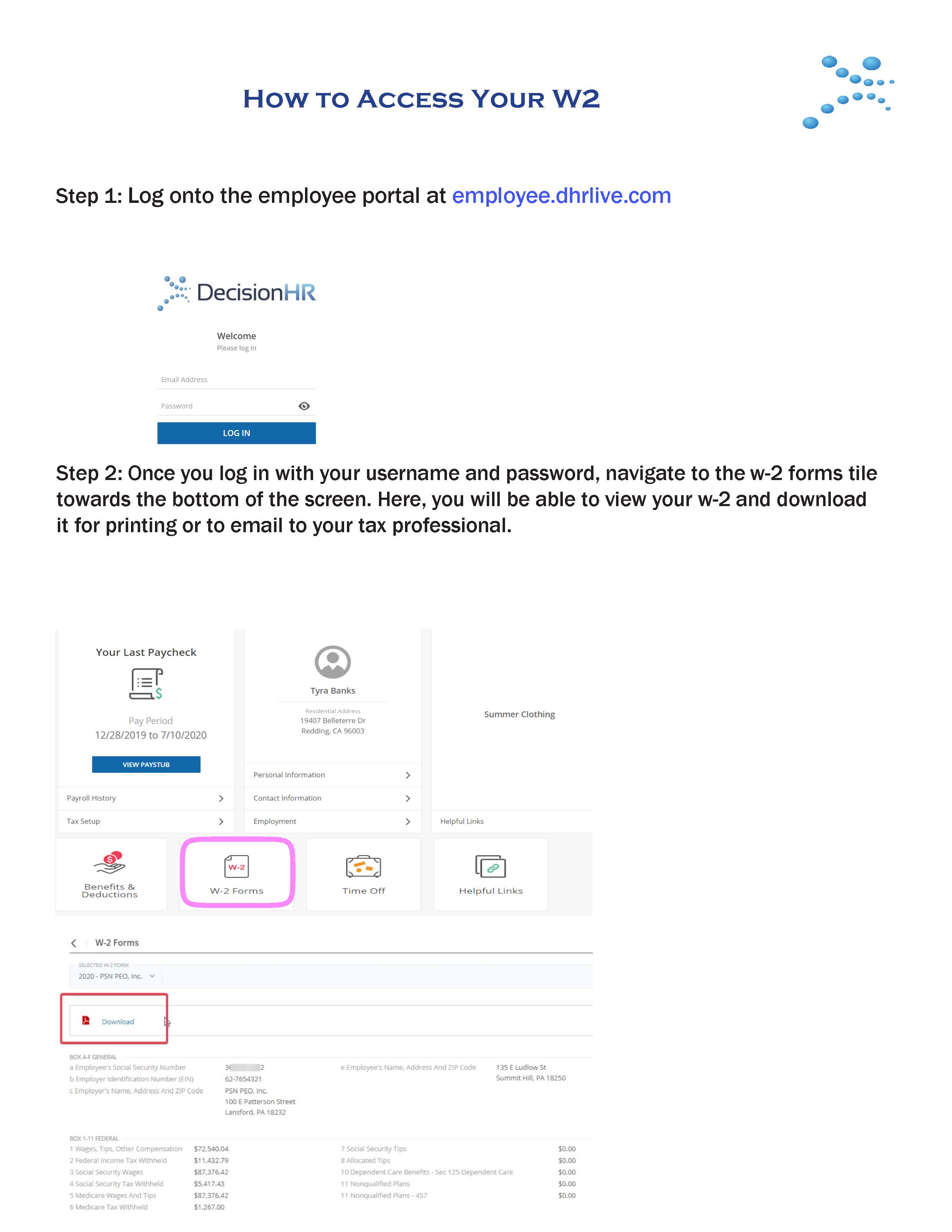
- Step 1: Log onto the employee portal at employee.dhrlive.com
- Step 2: Once you log in with your username and password, navigate to the W-2 forms tile towards the bottom of the screen. Here, you will be able to view your w-2 and download it for printing or to email to your tax professional.
PDF Instructions Available Here: link=PDF Index|How to Access Your Employee Portal
Changing Personal Information
Please email Payroll@FrostProductions.com to notify our Payroll Department of the changes you need to make. They will respond with the forms for you to fill out and submit back to them.
Paid Sick Leave Policy
Paid sick leave applies to all part-time employees at Frost. It does not apply to any persons hired as independent contractors. Please reference Paid_Safe_Sick_Leave-Notice_(English) for specific information regarding eligibility and the proper process for using paid sick leave. Sick leave pay can only be used for shifts you have a confirmed schedule. To use paid sick leave you must provide an employee verification form within 7 days of the missed shift. We do NOT need to know, nor are we permitted to ask, about the nature of the illness, condition, injury, or treatment for which the Sick Leave is being used.
To submit for sick leave, please fill out the document linked below and return it to our Payroll Department at Payroll@FrostProductions.com PaidSafeandSickLeave-VerificationForm
Updating Skill Codes and/or Pay Rates
If you would like to discuss updating your rates and/ or skill codes, please submit an updated resume along with your request to JohnC@FrostProductions.com.